Code:
Video Link : https://youtu.be/ju04tW0wUiY
📘 Title: "From Records to Response: A Frontend Story of API Data Flow"
🔹 Step 1: The Origin – Database Records
Imagine a college maintains digital student records — like subject details, results, or personal info — inside a system (a database). These records sit quietly, waiting to be used.
🔹 Step 2: Serialization – Making Data Understandable
Before this data can be shared, it needs to be converted into a universal format like JSON. This format is readable by all — websites, mobile apps, or other software.
Think of this like converting handwritten notes into a typed document anyone can read.
🔹 Step 3: API Endpoint – The Doorway
An API endpoint acts like a door. When a browser or app knocks (makes a request), it opens up and provides the serialized data in response.
URL Example: https://example.com/api/results/
🔹 Step 4: AJAX Call – The Frontend Makes a Request
On a webpage, JavaScript (via AJAX) sends a network call to this endpoint. This is like placing an order:
🔹 Step 4: AJAX Call – The Frontend Makes a Request
On a webpage, JavaScript (via AJAX) sends a network call to this endpoint. This is like placing an order:
javascript
CopyEdit
$.ajax({ url: "/api/results/", method: "GET", success: function(data) { // use the structured response console.log(data); } });
🔹 Step 5: The Response – Structured Data Arrives
The AJAX call receives a JSON response with all the needed details. Example:
json
CopyEdit
[ { "id": 1, "student": "John Doe", "subject_id": 101, "subject_name": "Computer Networks", "subject_code": "23A05501T", "marks": 87 }, ... ]
🔹 Step 6: Data for Any Application
This structured data can now be:
✅ Conclusion:
Even without touching the backend, the journey of data from a database to your HTML page involves:
-
Serializing it into JSON
-
Serving it through an endpoint
-
Accessing it via AJAX
-
Displaying or forwarding it to other apps
This is how raw data becomes usable, visible, and powerful.
Would you like a visual diagram or simple code setup with table display for this too?
<!DOCTYPE html>
<html lang="en">
<head>
  <meta charset="UTF-8">
  <title>Student Result Search</title>
  <script src="https://code.jquery.com/jquery-3.6.0.min.js"></script>

  <style>
    #autocomplete_suggestions {
      border: 1px solid #ccc;
      max-height: 150px;
      overflow-y: auto;
      position: absolute;
      background: white;
      width: 220px;
      z-index: 999;
    }
    .suggestion-item {
      padding: 8px;
      cursor: pointer;
    }
    .suggestion-item:hover {
      background-color: #f0f0f0;
    }
    table {
      margin-top: 20px;
      border-collapse: collapse;
      width: 100%;
    }
    th, td {
      padding: 8px;
      border: 1px solid #ccc;
    }
    th {
      background-color: #eee;
    }
  </style>
</head>
<body>

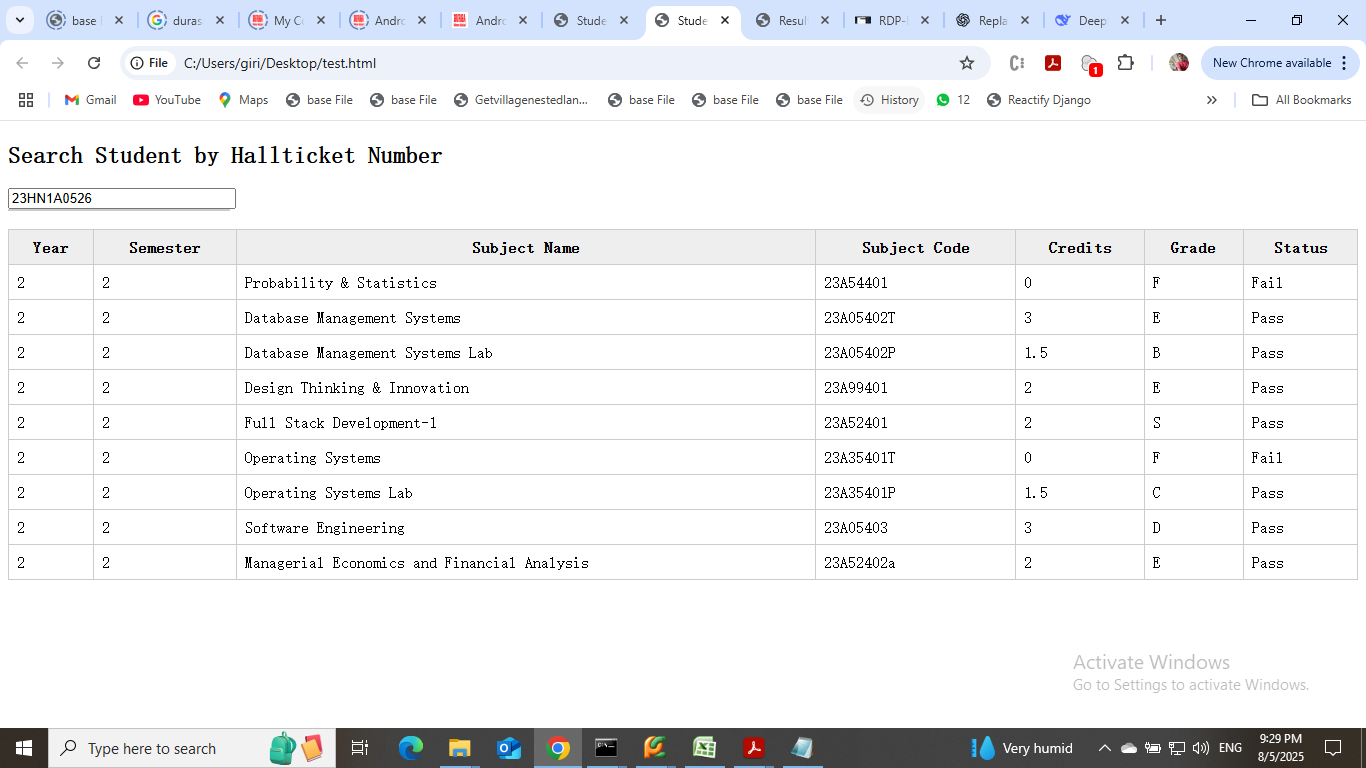
  <h2>Search Student by Hallticket Number</h2>
  <input type="text" id="roll_number_input" placeholder="Enter Roll Number" autocomplete="off" style="width: 220px;" />
  <div id="autocomplete_suggestions"></div>

  <table id="result_table">
    <thead>
      <tr>
        <th>Year</th>
        <th>Semester</th>
        <th>Subject Name</th>
        <th>Subject Code</th>
        <th>Credits</th>
        <th>Grade</th>
        <th>Status</th>
      </tr>
    </thead>
    <tbody>
      <!-- Results will appear here -->
    </tbody>
  </table>

  <script>
    // Autocomplete for roll number
    $('#roll_number_input').on('input', function () {
      let query = $(this).val().toLowerCase();
      if (query.length < 3) {
        $('#autocomplete_suggestions').empty();
        return;
      }

      $.get('https://aec.sites.marrichet.com/api/student/', function (data) {
        let filtered = data.filter(item => item.roll_number.toLowerCase().includes(query));
        let suggestions = filtered.map(item =>
          `<div class="suggestion-item" data-id="${item.id}" data-roll="${item.roll_number}">
            ${item.roll_number} (${item.studentclassname})
          </div>`
        ).join('');
        $('#autocomplete_suggestions').html(suggestions);
      });
    });

    // On click suggestion
    $(document).on('click', '.suggestion-item', function () {
      let studentId = $(this).data('id');
      let roll = $(this).data('roll');

      $('#roll_number_input').val(roll);
      $('#autocomplete_suggestions').empty();

      $.get(`https://aec.sites.marrichet.com/api/result/?student__id=${studentId}`, function (results) {
        let rows = results.map(r => `
          <tr>
            <td>${r.year}</td>
            <td>${r.semester}</td>
            <td>${r.subject_name || ''}</td>
            <td>${r.subject_code || ''}</td>
            <td>${r.credits != null ? r.credits : ''}</td>
            <td>${r.grade || ''}</td>
            <td>${r.pass_status || ''}</td>
          </tr>
        `).join('');

        if (rows.length > 0) {
          $('#result_table tbody').html(rows);
        } else {
          $('#result_table tbody').html('<tr><td colspan="7">No results found.</td></tr>');
        }
      });
    });
  </script>

</body>
</html>
3rd Year CSE-B
completed
23HN1A0562(14-08-2025)
23HN1A0563(14/08/2025)
23HN1A0572(14/08/2025) |